
Convert PDF to PDF/A

This article explains how to convert PDF documents to PDF/A with Docotic.Pdf. This .NET library includes a high-performance PDF-to-PDF/A converter that runs entirely offline. You can also use Docotic.Pdf to create PDF/A documents from scratch.

Why convert PDF to PDF/A?
PDF/A is a special version of PDF designed for archiving. Converting standard PDF documents to PDF/A provides several benefits:
-
Long-term preservation
PDF/A documents remain accessible and usable for many years, making them ideal for legal, governmental, and archival purposes. -
Regulatory compliance
Industries with strict compliance and legal requirements often store documents in PDF/A. -
Consistent appearance across PDF viewers
PDF/A documents are displayed consistently across different systems and in different PDF viewers.
Read the What is PDF/A? article for more information about the PDF/A standard.
PDF to PDF/A in C#
To convert from PDF to PDF/A, you need:
- Docotic.Pdf with the Conformance add-on.
- A license key. You can get a free time-limited license from the download page.
The following C# code converts a PDF file to PDF/A-4:
using var pdf = new PdfDocument("input.pdf");
pdf.SaveAsPdfa("output.pdf", PdfaConformanceLevel.Pdfa4);
The SaveAsPdfa
method is provided by the add-on in the BitMiracle.Docotic.Pdf.Conformance namespace. It supports
all PDF/A conformance levels: PDF/A-1a, PDF/A-1b, PDF/A-2a, PDF/A-2b, PDF/A-2u, PDF/A-3a, PDF/A-3b,
PDF/A-3u, PDF/A-4, PDF/A-4e, PDF/A-4f. The output can be written to either a file or a stream.
If the source document cannot be converted to the requested PDF/A conformance level,
SaveAsPdfa throws a ConformanceException. See the Error handling section
for details.
Advanced conversion scenarios
Docotic.Pdf supports a wide range of PDF/A workflows, including creating PDF/A documents from scratch, converting HTML to PDF/A, and merging documents into a single PDF/A file.
Create PDF/A documents
Docotic.Pdf provides different ways to create PDF documents in .NET. You can use
the same SaveAsPdfa method to generate PDF/A documents with the Core API or the Layout API.
This C# code creates a PDF/A-3u document using the Core API:
using var pdf = new PdfDocument();
pdf.Pages[0].Canvas.DrawString("Hello PDF/A");
pdf.SaveAsPdfa("output.pdf", PdfaConformanceLevel.Pdfa3U);
With the Layout API, you make a regular PDF document and then convert it to PDF/A. This code sample shows how to generate a PDF/A-1b document:
using var ms = new MemoryStream();
PdfDocumentBuilder.Create().Generate(ms, doc => doc.Pages(pages =>
{
    pages.Content().Text("Hello, world!");
}));

using var pdf = new PdfDocument(ms);
pdf.SaveAsPdfa("output.pdf", PdfaConformanceLevel.Pdfa1B);
HTML to PDF/A
The HtmlToPdf add-on converts HTML to PDF. To prepare the result for archiving, save the generated PDF as PDF/A:
var uri = new Uri("https://google.com");
var options = new HtmlConversionOptions
{
    PreserveStructureInformation = true,
};

using var converter = await HtmlConverter.CreateAsync();
using var pdf = await converter.CreatePdfAsync(uri, options);
pdf.SaveAsPdfa("output.pdf", PdfaConformanceLevel.Pdfa3A);
The PreserveStructureInformation = true option helps produce accessible documents. This is
important for PDF/A-1a, PDF/A-2a, or PDF/A-3a conformance levels.
Combine PDF documents to PDF/A
Docotic.Pdf supports merging of PDF documents. Replace the PdfDocument.Save call
with SaveAsPdfa to save the merged document as PDF/A:
using var pdf = new PdfDocument("first.pdf");
pdf.Append("second.pdf");
pdf.SaveAsPdfa("merged.pdf", PdfaConformanceLevel.Pdfa1B);
You can apply the same principle in other PDF editing scenarios. For example, remove PDF pages, edit text, flatten form fields and finally save as PDF/A.
Create ZUGFeRD / Factur-X files in C#
Factur-X / ZUGFeRD is a European e-invoice standard based on PDF/A-3. You can use Docotic.Pdf to embed an XML invoice file and produce a valid Factur-X / ZUGFeRD document:
using var pdf = new PdfDocument();

PdfFileSpecification xml = pdf.CreateFileAttachment("your_path_to/xrechnung.xml");
xml.Relationship = "Alternative";
pdf.SharedAttachments.Add(xml);

var fx = new XmpSchema("fx", "urn:factur-x:pdfa:CrossIndustryDocument:invoice:1p0#");
var props = fx.Properties;
props.Add(new XmpProperty("DocumentType", new XmpString("INVOICE")));
props.Add(new XmpProperty("DocumentFileName", new XmpString("xrechnung.xml")));
props.Add(new XmpProperty("Version", new XmpString("3.0")));
props.Add(new XmpProperty("ConformanceLevel", new XmpString("XRECHNUNG")));

pdf.Metadata.Schemas.Add(fx);

pdf.SaveAsPdfa("zugferd.pdf", PdfaConformanceLevel.Pdfa3A);
Create Order-X documents
Order-X is another EU standard that allows electronic processing of purchase orders. This C# snippet shows how to create an Order-X document using the COMFORT profile:
using var pdf = new PdfDocument();

using (var file = File.OpenRead("order-data-comfort.xml"))
{
    PdfFileSpecification xml = pdf.CreateFileAttachment(file, "order-x.xml");
    xml.Relationship = "Data";
    pdf.SharedAttachments.Add(xml);
}

var fx = new XmpSchema("fx", "urn:factur-x:pdfa:CrossIndustryDocument:1p0#");
var props = fx.Properties;
props.Add(new XmpProperty("DocumentType", new XmpString("ORDER")));
props.Add(new XmpProperty("DocumentFileName", new XmpString("order-x.xml")));
props.Add(new XmpProperty("Version", new XmpString("1.0")));
props.Add(new XmpProperty("ConformanceLevel", new XmpString("COMFORT")));

pdf.Metadata.Schemas.Add(fx);

pdf.SaveAsPdfa("order-x.pdf", PdfaConformanceLevel.Pdfa3B);
Convert protected PDF files to PDF/A
Converting encrypted PDF files is no different. Open the document with the correct password
and call SaveAsPdfa:
using var pdf = new PdfDocument(fileName, new PdfStandardDecryptionHandler("password"));
pdf.SaveAsPdfa("result.pdf", PdfaConformanceLevel.Pdfa4E);
Batch processing
You can automate conversion of multiple PDF files to PDF/A. Enumerate all PDF files in a directory and convert each document to PDF/A. This code sample shows how to convert files in parallel:
public static async Task ConvertAsync(string directoryPath)
{
    string[] files = Directory.GetFiles(directoryPath, "*.pdf", SearchOption.AllDirectories);
    if (files.Length == 0)
        return;

    var semaphore = new SemaphoreSlim(Environment.ProcessorCount);
    var tasks = new List<Task>(files.Length);
    foreach (var f in files)
    {
        await semaphore.WaitAsync();

        var task = Task.Run(() =>
        {
            string outputFileName = $"{Path.GetFileName(f)}-{Guid.NewGuid()}.pdf";
            try
            {
                using var pdf = new PdfDocument(f);
                pdf.SaveAsPdfa(outputFileName, PdfaConformanceLevel.Pdfa1B);
            }
            finally
            {
                semaphore.Release();
            }
        });

        tasks.Add(task);
    }

    await Task.WhenAll(tasks);
}
When you implement a conversion workflow for arbitrary PDF files, it's worth validating all the resulting files for PDF/A compliance. You can find a ready-to-use application for batch conversion and validation in the Evaluate the conversion quality section.
Error handling
Conversion may fail in some situations. For example, when:
- An input file is not a PDF
- An invalid password is provided for an encrypted PDF
- Unable to embed font bytes for PDF/A
Docotic.Pdf throws exceptions in such cases. This sample code shows how to handle exceptions:
try
{
    using var pdf = new PdfDocument("input.pdf");
    pdf.SaveAsPdfa("output.pdf", PdfaConformanceLevel.Pdfa1B);
}
catch (PdfException ex)
{
    Console.WriteLine($"Problem with an input document: {ex.Message}");
}
catch (ConformanceException ex)
{
    Console.WriteLine($"Unable to convert to PDF/A: {ex.Message}");
}
Convert from PDF/A to PDF
Converting from PDF/A to PDF is sometimes used to enable easier editing of documents. The process is much simpler than PDF to PDF/A conversion. You just need to remove a portion of XMP metadata. Sample code:
using var pdf = new PdfDocument("pdfa-compliant.pdf");

var schemas = pdf.Metadata.Schemas;
for (int i = 0; i < schemas.Count; ++i)
{
    if (schemas[i].Namespace == "http://www.aiim.org/pdfa/ns/id/")
    {
        schemas.RemoveAt(i);
        --i;
    }
}

pdf.Save("regular.pdf");
Why choose Docotic.Pdf for PDF to PDF/A conversion?
Docotic.Pdf is a high-performance, pure C# .NET library without external dependencies. You can use it to produce PDF/A documents on Windows, Linux, macOS, Android, iOS, or in a cloud environment. In addition, Docotic.Pdf provides the following advantages:
Standalone offline conversion
The conversion happens entirely on your computer. No data is ever transmitted to external servers or third-party providers. Offline conversion helps protect sensitive documents because no data leaves your environment.
Quality
Docotic.Pdf is designed to preserve as much of the original information as possible during conversion, without sacrificing quality.
ISO compliance
Docotic.Pdf produces PDF/A files compliant with the ISO standards:
- ISO 19005-1:2005 (PDF/A-1)
- ISO 19005-2:2011 (PDF/A-2)
- ISO 19005-3:2012 (PDF/A-3)
- ISO 19005-4:2020 (PDF/A-4)
Every Docotic.Pdf build passes through thousands of automated tests. The PDF-to-PDF/A tests use a large collection of PDF files from different sources and convert them to various PDF/A conformance levels. The resulting files are then verified for PDF/A compliance.
One group of tests checks that veraPDF reports no issues for the converted files. A second group of tests compares each resulting file with its expected PDF/A version, which has been verified to contain no compliance issues by both veraPDF and Adobe Acrobat Preflight.
Evaluate the conversion quality
We provide the open-source PdfToPdfa project. It's a .NET console application that converts PDF files to PDF/A. After the conversion, the app validates each resulting document. The project uses Docotic.Pdf for conversion and veraPDF for validation.
You can use this application in the command-line mode to automate your PDF/A workflows. Or use it in UI mode to quickly evaluate conversion quality and performance.
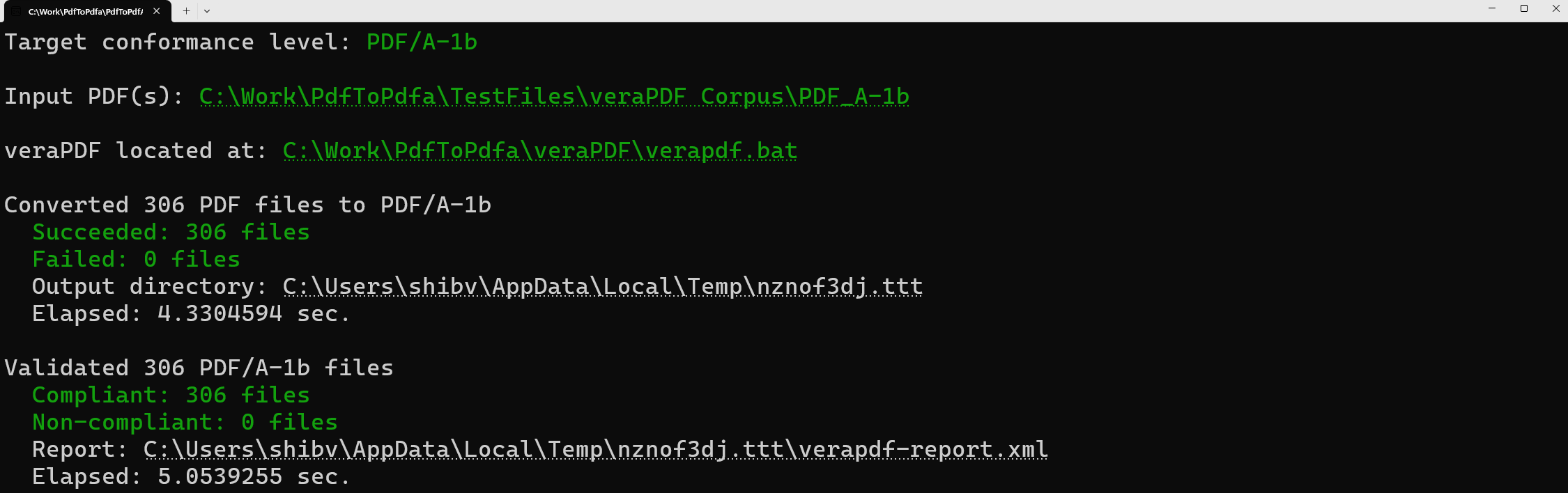
The application processes an arbitrary PDF file or directory. For your convenience, the project repository also includes test files from veraPDF corpus and Isartor Test Suite.
What happens during a conversion to PDF/A?
PDF/A specifications define a huge list of requirements for a compliant document. The converter validates and enforces all of them to produce valid PDF/A files. At a high level, it checks every PDF object and fixes detected PDF/A compliance issues.
Not every PDF can be converted to PDF/A without altering its contents. Some PDF features are prohibited by the selected PDF/A conformance level, so the converter must either remove or transform them. As a result, conversion can be a lossy process.
For example, PDF/A-1 does not permit optional content (layers), embedded files (attachments), or transparency. If an original PDF document uses these features, the converter flattens layers, removes attachments and transparency. If preserving such content is important, choose a PDF/A conformance level that supports it:
- All PDF/A-2, PDF/A-3, and PDF/A-4 conformance levels support transparency and optional content.
- PDF/A-3, PDF/A-4, and PDF/A-4f support arbitrary embedded files. PDF/A-2 and PDF/A-4 support embedded PDF/A files only.
Let's review how Docotic.Pdf fixes the most common issues.
Fonts and text
The converter attempts to embed every font used in the document. For fonts that are not already embedded, it first tries to load the appropriate font data from the system font collection or a custom font source. If no matching font is found, a substitute font is used.
You can customize this process by providing custom font loaders. The IFontLoader interface is
used to load the font data. The DirectoryFontLoader implementation, for example, loads font bytes
from one or more specified directories.
You can also provide an implementation of the IFallbackFontProvider interface to supply
substitute fonts when IFontLoader cannot load the requested font.
The following example shows how to customize font loading:
public static void ConfigurePdfToPdfa(
    string fileName,
    PdfaConformanceLevel level,
    Stream output,
    IFontLoader? fontLoader,
    IFallbackFontProvider? fallbackFontProvider)
{
    var config = PdfConfigurationOptions.Create();
    if (fontLoader != null)
        config.FontLoader = fontLoader;

    if (fallbackFontProvider != null)
        config.FallbackFontProvider = fallbackFontProvider;

    using var pdf = new PdfDocument(fileName, config);
    pdf.SaveAsPdfa(output, level);
}
Docotic.Pdf also fixes inconsistent glyph widths, CMap and ToUnicode streams. Undefined characters are removed during the conversion process.
Metadata
The converter corrects or removes invalid metadata schemas or properties, adds the pdfaid schema,
synchronizes the XMP metadata and document information dictionary.
The Conformance add-on also provides the
ReadPdfaConformance
extension method for PdfDocument. Use this method to read the PDF/A conformance level declared
in the XMP metadata:
using var pdf = new PdfDocument("input.pdf");
PdfaConformanceLevel? level = pdf.ReadPdfaConformance();
Colors
The converter provides output intent ICC profiles for device colors because device-dependent colors are not allowed in PDF/A documents. It also fixes non-compliant output intents and color spaces.
Transparency is removed when producing PDF/A-1 documents. This affects blend modes, soft masks, and transparency groups. Invalid image properties are also fixed.
Embedded files
Handling of embedded files depends on the PDF/A conformance level. In PDF/A-1, all embedded files are removed.
In PDF/A-2 and PDF/A-4, embedded PDF files are converted to PDF/A. Non-PDF attachments are removed. For embeddeed PDF/A files, MIME types and file relationships are also fixed in PDF/A-4.
In PDF/A-3, attachments are not removed, but file relationships and MIME types are fixed.
Interactive features
The converter generates missing or invalid appearance streams. It also fixes invalid annotation properties, flattens annotations of not permitted types, and removes actions of not permitted types.
XFA forms are removed for PDF/A-2, PDF/A-3, and PDF/A-4. Only PDF/A-1 allows XFA forms but they are still not recommended for long-term archiving.
Optional content is flattened when targeting PDF/A-1. For other conformance levels, the converter fixes optional content configuration dictionaries with incomplete order arrays, missing names, or duplicate names.
Digital signatures
Digital signatures do not allow modifications to the signed content by design. If the signed portion of the PDF contains PDF/A compliance issues, the converter fixes them and invalidates the signature.
Other areas
For accessibility, the converter adds basic document structure information if it is missing. It also fixes invalid or non-standard structure tags. This applies to PDF/A-1a, PDF/A-2a, and PDF/A-3a documents.
PDF/A files must not be encrypted, so the converter does not allow encryption of output files.
LZW-compressed data is not allowed in PDF/A. The converter recompresses LZW streams using Flate compression. It also fixes non-compliant array, dictionary, number, name, and string objects.
Invalid file headers or cross-reference sections are automatically fixed too.
Conclusion
Docotic.Pdf with the Conformance add-on provides a high-quality PDF-to-PDF/A converter. You can convert existing PDF documents to any PDF/A conformance level or create PDF/A documents from scratch. The library works completely on-premises, so your data never leaves your servers.
You can explore runnable C# and VB.NET examples for creating and processing PDF/A documents in the PDF/A section of the sample repository.
There is also the open-source PdfToPdfa application for PDF-to-PDF/A conversion. You can use it to automate PDF/A workflows or simply convert PDF files to PDF/A.
Frequently Asked Questions
How to choose the right PDF-to-PDF/A converter?
A good PDF-to-PDF/A converter should:
- Produce PDF/A-compliant files.
- Preserve information and visual appearance from source documents.
- Run locally without sending files to third-party servers.
- Work fast.
- (if automation required) Support execution without UI.
The Docotic.Pdf library meets all criteria and is a good choice for conversion from PDF to PDF/A.
How to validate the PDF/A document is compliant?
Use validation software. A good PDF/A validator should:
- Follow ISO standards for PDF/A in depth.
- Run locally without sending files to third-party servers.
- Work fast.
- (if automation required) Support execution without UI.
veraPDF is an industry-standard validation tool that supports all of these requirements.
How to automate PDF to PDF/A conversion workflow?
Convert PDF files using the Docotic.Pdf Conformance add-on. Validate results with veraPDF validator. Track progress for conversion and validation.
The open-source PdfToPdfa application implements this workflow. Use it as the starting point for your own implementation.
Which PDF/A version should I use?
Read the How to choose a PDF/A version section.
Can I embed an XML file into PDF for ZUGFeRD?
Yes, definitely. Look at examples in the Produce ZUGFeRD / Factur-X files section.
How to protect PDF/A document?
It's technically impossible. PDF/A files must not be encrypted.
